GameObject是一个壳子,它关联着所有资源以及组件的引用。GameObject也有自己的一套资源管理方式,Unity提供了丰富的接口来操作它。下面我们逐一总结GameObject的创建、删除、修改和查询方法。
创建GameObject
- 通过将资源读取在内存中,然后使用
Instantiate方法实例化创建资源副本。比如使用Resources方法、AssetBundle方法、AssetDatabase方法等
- 使用
new GameObject创建,接着在后面挂脚本或者设置参数等。
我们可以使用以下脚本在运行时创建一个Camera
1
2
3
4
5
6
7
8
9
10
| using UnityEngine;
public class TestScript : MonoBehaviour
{
void Start()
{
GameObject myCamera = new GameObject("MyCamera",typeof(Camera));
myCamera.transform.position = Vector3.one*10f;
}
}
|
可以使用SetSiblingIndex方法设置子节点下所有对象的排序,这个方法配合Layout Group比较常用。
1
2
3
4
5
6
7
8
9
10
11
12
13
14
15
16
| using UnityEngine;
public class SetSiblingScript : MonoBehaviour
{
public GameObject g1,g2;
private void OnGUI() {
if(GUILayout.Button("设置g1在首位"))
g1.transform.SetAsFirstSibling();
if(GUILayout.Button("设置g1在末位"))
g1.transform.SetAsLastSibling();
if(GUILayout.Button("和g2位置交换"))
g1.transform.SetSiblingIndex(g2.transform.GetSiblingIndex());
if(GUILayout.Button("设置在g2后面"))
g1.transform.SetSiblingIndex(g2.transform.GetSiblingIndex() + 1);
}
}
|
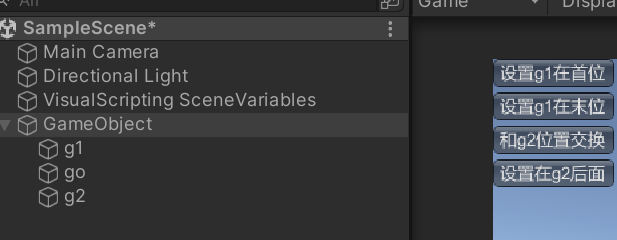
删除节点
使用GameObject.Destroy方法,可以将某个节点(包括自身下所有Component)删除并调用OnDestroy,如果想删除子节点,可以使用Transform.GetChild(index)并通过一个while循环来删除每个子节点
1
2
3
4
5
6
7
8
9
10
11
| using UnityEngine;
public class DestroyChildScript : MonoBehaviour
{
void Start()
{
while(gameObject.transform.childCount>0){
GameObject.DestroyImmediate(transform.GetChild(0).gameObject);
}
}
}
|
如果需要安全删除,使用Destroy并且从后向前删除
1
2
3
4
| for (int i = transform.childCount - 1; i >= 0 ; i--)
{
Destroy(transform.GetChild(i).gameObject);
}
|
获取游戏对象
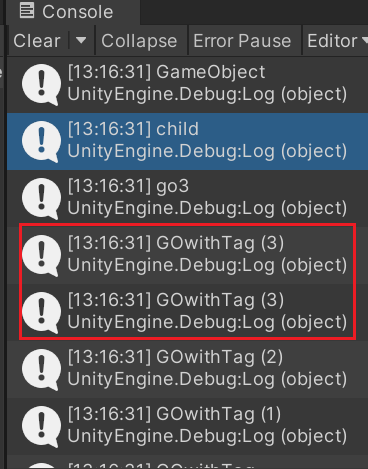
我们既可以通过完整路径获取游戏对象,也可以根据某个游戏对象获取它的子对象。此外,还可以通过tag来获取。
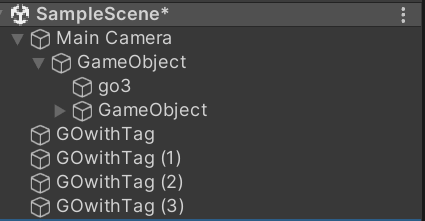
1
2
3
4
5
6
7
8
9
10
11
12
13
14
15
16
17
18
19
20
21
22
23
24
25
26
| using UnityEngine;
public class GetGameObjectScript : MonoBehaviour
{
void Start()
{
GameObject g1 = GameObject.Find("Main Camera/GameObject");
Debug.Log(g1.name);
GameObject g2 = g1.transform.Find("GameObject/child").gameObject;
Debug.Log(g2.name);
GameObject g3 = g1.transform.GetChild(0).gameObject;
Debug.Log(g3.name);
GameObject g4 = GameObject.FindGameObjectWithTag("ATAO");
Debug.Log(g4.name);
foreach(var go in GameObject.FindGameObjectsWithTag("ATAO")){
Debug.Log(go.name);
}
}
}
|
管理游戏组件
Unity提供了很多Component方法来实现组件的增删查改
1
2
3
4
5
6
7
8
9
10
11
12
13
14
15
16
17
18
19
20
21
22
23
24
25
26
27
28
29
30
31
32
| using UnityEngine;
public class ManageComponents : MonoBehaviour
{
void Start()
{
GameObject go = new GameObject();
if(!go.GetComponent<Camera>())
go.AddComponent<Camera>();
go.GetComponentInChildren<Camera>();
foreach(var component in go.GetComponentsInChildren<Camera>()){
}
go.GetComponentInParent<Camera>();
foreach(var component in go.GetComponentsInParent<Camera>()){
}
Camera c1 = GameObject.FindObjectOfType<Camera>();
foreach(var item in GameObject.FindObjectsOfType<Camera>()){}
Destroy(GetComponent<Camera>());
DestroyImmediate(GetComponent<Camera>());
}
}
|